AnyLayout in SwiftUI: Animating List to Grid Transitions
AnyLayout in SwiftUI: Animating List to Grid Transitions
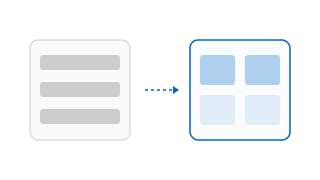
In SwiftUI, transitioning a collection of views between a vertical list (VStack) and a grid (LazyVGrid) has historically resulted in broken animations. Because switching layouts required changing the underlying structural container view, the SwiftUI render engine treated the transition as a removal of the old view hierarchy and an insertion of a new one. This caused layout jumps instead of smooth translations.
SwiftUI addresses this with AnyLayout. It provides a type-erased wrapper for any type conforming to the Layout protocol, allowing you to transition between layout types while preserving the identity of subviews.
Dynamic Layout Switching
By wrapping layouts inside AnyLayout, you can swap the container structure at runtime. SwiftUI preserves the identity of child elements, enabling smooth transitions between list and grid presentations.
Here is how you swap between a vertical list layout and a multi-column grid layout based on state changes:
import SwiftUI

struct GalleryView: View {
    @State private var isGridView: Bool = false

    // Developer Thoughts: We instantiate AnyLayout dynamically.
    // SwiftUI matches the identities of child views across the change,
    // allowing elements to slide smoothly into their new positions.
    private var activeLayout: AnyLayout {
        if isGridView {
            return AnyLayout(Grid(horizontalSpacing: 12, verticalSpacing: 12))
        } else {
            return AnyLayout(VStackLayout(spacing: 16))
        }
    }

    var body: some View {
        ScrollView {
            activeLayout {
                ForEach(0..<12) { index in
                    // GridRow wrapper is required when using Grid layout
                    MaybeGridRow(isGrid: isGridView) {
                        RoundedRectangle(cornerRadius: 12)
                            .fill(Color.blue.opacity(0.15))
                            .frame(height: isGridView ? 100 : 60)
                    }
                }
            }
            .padding(16)
            // Animate layout changes smoothly
            .animation(.spring(response: 0.4, dampingFraction: 0.8), value: isGridView)
        }
    }
}

// Helper view to conditionally apply GridRow wrapping
struct MaybeGridRow<Content: View>: View {
    let isGrid: Bool
    @ViewBuilder var content: Content

    var body: some View {
        if isGrid {
            GridRow {
                content
            }
        } else {
            content
        }
    }
}
Summary
AnyLayout allows you to animate transitions between different layout types, such as lists and grids, by preserving subview identity. Swapping layouts within an .animation block lets elements slide smoothly into their new coordinates. Keep in mind that layout transitions can be computationally intensive, so minimize view hierarchy complexity to prevent dropped frames during animations.